

This sample project describes how to drive the WS2812 LED strip with Arduino Uno.
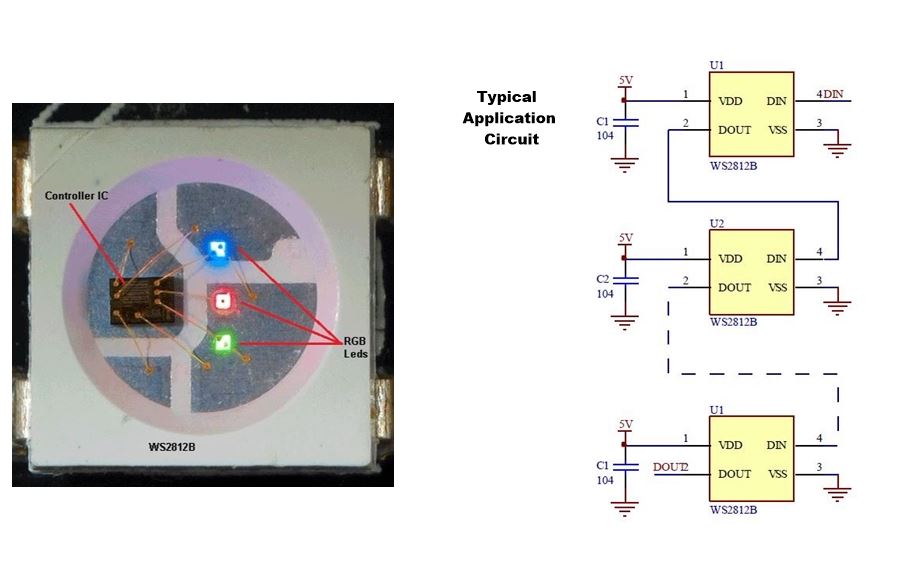
Each WS2812B chip contains R, G, B Leds and a PWM controller IC built into it, in a 5050 SMD package (5mm x 5mm).
Each chip can be addressed individually and the brightness level set from 0 – 255, in order to achieve the desired colour.
Each LED in the chip can consume a current of up to 15mA, so a total of about 45mA current is consumed by a single chip when all three RGB LEDs are operating at full brightness.
So the Power Supply needs to handle the required current depending on the number of LED chips being driven.
The original LED Chip design is by World-Semi
The WS2812B Datasheet Can be Downloaded here
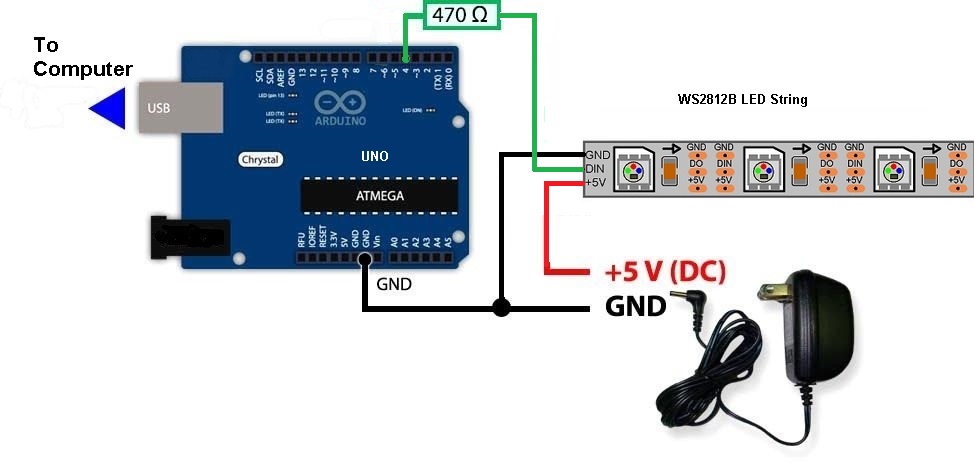
Connection to Arduino:
Below is the Sample Arduino code to drive an 8 LED string.
For this project the FastLED Library is being used.
Before beginning, install the library. From Arduino IDE, Tools -> Manage Libraries , search for FastLED and install it.
Arduino Code:
//LED scan R, G, B in tern
//AMP technology @ 2019

#include <FastLED.h>

#define LED_PIN     4     //Pin-4 is the data pin, any pin can be used
#define NUM_LEDS    8     //No of leds in the string

CRGB leds[NUM_LEDS];

void setup() {
  //Set up FastLED library
  FastLED.addLeds<WS2812, LED_PIN, GRB>(leds, NUM_LEDS);

}

void loop(){
  ScanRedLED();     //Scan red LEDs
  ScanBlueLED();    //Scan Blue LEDs
  ScanGreenLED();   //Scan Green LEDs
}


void ScanBlueLED() {
  for (int i = 0; i <= NUM_LEDS; i++) {
    leds[i] = CRGB ( 0, 0, 255);     //255 is the Blue max brightness level
    FastLED.show();
    delay(50);
  }
  for (int i = NUM_LEDS; i >= 0; i--) {
    leds[i] = CRGB ( 0, 0, 0);       //Turn off all leds
    FastLED.show();
    delay(50);
  }
}

void ScanGreenLED() {
  for (int i = 0; i <= NUM_LEDS; i++) {
    leds[i] = CRGB ( 0, 255, 0);      //255 is the Green max brightness level
    FastLED.show();
    delay(50);
  }
  for (int i = NUM_LEDS; i >= 0; i--) {
    leds[i] = CRGB ( 0, 0, 0);        //Turn off all leds
    FastLED.show();
    delay(50);
  }
}

void ScanRedLED() {
  for (int i = 0; i <= NUM_LEDS; i++) {
    leds[i] = CRGB ( 255, 0, 0);    //255 is the Red max brightness level
    FastLED.show();
    delay(50);
  }
  for (int i = NUM_LEDS; i >= 0; i--) {
    leds[i] = CRGB ( 0, 0, 0);       //Turn off all leds
    FastLED.show();
    delay(50);
  }
} AMP Tech-Articles
Leave a comment